Table of Contents
If you know how to search for keywords on YouTube comments properly, you can find repeated questions, discover long-tail keywords, spot audience problems, and even figure out how real people naturally describe things.
That last part matters a lot more than most people think.
Keyword tools usually give polished phrases that sound robotic sometimes. Comments are different. People type naturally inside comment sections. That means the wording often matches how viewers actually search on YouTube or Google.
Quick Answer: To search for keywords on YouTube comments, use Ctrl+F, YouTube Studio filters, browser extensions, or comment finder tools to search comment sections for repeated phrases, questions, and audience wording. These repeated comment patterns can help creators discover video ideas, title keywords, and audience interests.
Why YouTube Comments Are Good for Keyword Research
Most people think keyword research only happens inside SEO tools.
But honestly, some of the best keyword ideas come from real viewers talking naturally.
For example, a keyword tool might suggest something broad like:
budget gaming setup
But inside comments, viewers may repeatedly say things like:
cheap gaming setup that doesn’t lag
or:
gaming setup for low-end PC
Those phrases are way more specific and sound exactly like real search queries.
That is why many creators now use comments for:
- video title ideas
- finding content gaps
- description keywords
- audience research
- long-tail keyword discovery
Even many search results ranking for this topic focus heavily on audience insights and keyword discovery from comments instead of only finding specific comments.
5 Ways to Search for Keywords on YouTube Comments
Before you can find useful keyword ideas, you first need a way to search through comments properly.
There are a few easy methods depending on the size of the comment section.
Use Ctrl+F for Smaller Videos
If a video only has a few hundred comments, the easiest method is using your browser search.
Open the YouTube video, scroll through the comments for a bit so more comments load, then press Ctrl+F on Windows or Command+F on Mac.
Now type a word related to your niche.
If your channel is about phones, you could search things like:
- battery
- camera
- lag
- heating
- budget
You will quickly start noticing repeated phrases viewers use.
Google Chrome also explains how Find in Page works in its official browser guide. Chrome Help
The downside is that YouTube only loads comments while you scroll. So Ctrl+F only searches comments currently loaded on the screen.
For videos with thousands of comments, this method misses a lot.
Use a YouTube Comment Finder Tool
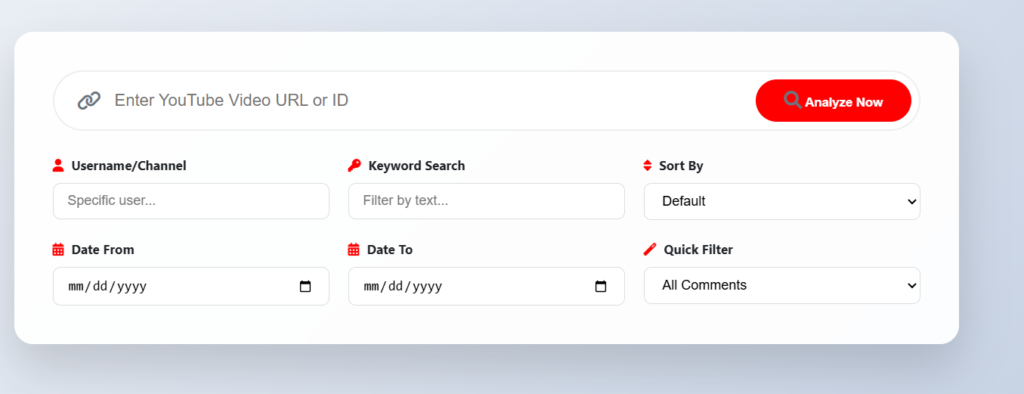
For larger videos, using a dedicated comment finder tool works much better.
You can paste a video link into YT Comment Finder, load all comments, and search words or phrases instantly.
This is where keyword research becomes really useful because patterns become easier to spot.
You may suddenly notice dozens of viewers asking almost the same thing:
does this still work in 2026?
or:
can beginners do this?
That is basically free content research sitting inside the comments.
Several modern comment search tools also now focus on audience analysis and discussion trends, not just finding one comment.
If you are trying to find comments from one specific person instead of researching phrases, this guide on how to find YouTube comments by username explains how to search comments from a particular user across videos.
Search Comments Inside YouTube Studio
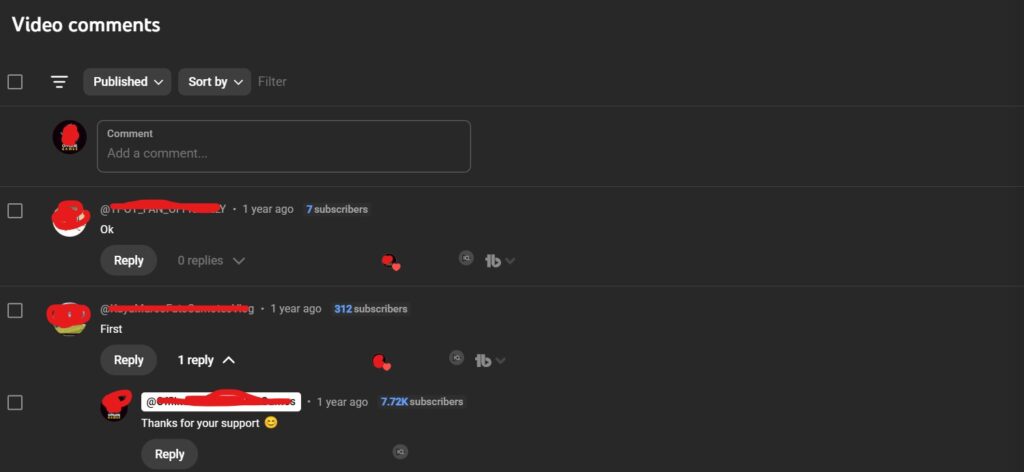
If you own a YouTube channel, YouTube Studio already includes comment filters.
Open YouTube Studio and go to the Comments section. From there you can search phrases, filter comments, and find repeated viewer questions across your videos.
YouTube also explains comment moderation and filters in its official support documentation. YouTube Support
This is useful because your own audience usually gives the best future content ideas.
Use a Chrome Extension to Search Comments Faster
If you search YouTube comments regularly, using a Chrome extension is honestly much faster than manually copying video links every time.
Extensions like the YCF Chrome extension add comment search features directly on YouTube pages. Instead of opening another website, you can search comments while watching the video itself. The extension can also quickly show video stats like total comments, views, and likes.
This is useful when researching multiple videos quickly because you can move from one video to another without constantly pasting links into external tools.
Some extensions also support filtering comments, searching replies, and exporting comment data for larger research projects. Open-source tools like YCS Continued even support searching replies, transcripts, and chat replays.
For creators, this makes spotting repeated phrases much easier. After checking a few videos in the same niche, you usually start noticing similar audience questions appearing over and over again.
If you are trying to find comments from one specific person instead of researching phrases, this guide on finding YouTube comments by username explains how to search comments from a particular user across videos.
The Question Mark Trick Most Creators Ignore
One really simple trick is searching for just a question mark.
Seriously, just search “?” inside comments.
Suddenly you can see all the questions viewers are asking.
This works surprisingly well because questions usually reveal:
- confusion
- missing information
- future content ideas
- search intent
- viewer problems
If multiple people ask:
does this work without paying?
then that can easily become a new video topic.
Sometimes the best long-tail keywords are hidden inside repeated viewer questions.
How to Turn Comment Keywords Into Better Titles
Once you start noticing repeated phrases in comments, use that wording naturally inside your titles and descriptions.
For example, instead of using a generic title like:
Beginner Streaming Setup
your comments may repeatedly mention:
streaming setup without expensive equipment
That second phrase sounds much more natural because real viewers already use it.
People on SEO forums and creator communities also regularly mention that real audience wording from comments often works better than relying only on keyword tools.
The important thing is not stuffing exact keywords everywhere. Just use the natural phrasing viewers already repeat inside comments.
Why This Works Better Than Normal Keyword Research Sometimes
Traditional keyword tools mostly show estimated search data.
Comments show real people explaining real problems.
That difference matters because search engines care a lot more about search intent now, not only exact keywords. Many SEO discussions also point out that understanding audience intent matters more than simply repeating keywords.
When multiple viewers naturally repeat the same question or phrase, there is a good chance other people are searching for similar wording too.
Older comments can also be surprisingly useful for finding forgotten audience questions and repeated viewer problems. This guide on finding old YouTube comments you posted helps locate previous discussions faster.
Final Thoughts
YouTube comments are honestly one of the most underrated places for keyword research.
If you regularly search comments for repeated phrases and audience questions, you start noticing patterns everywhere. Viewers literally tell creators what they are confused about, what they want next, and how they naturally describe problems.
That kind of information is hard to get from normal keyword tools alone.
Once you get into the habit of checking comment patterns before making videos, it becomes much easier to come up with topics people actually care about.
Frequently Asked Questions
Does YouTube have a built-in comment search?
Nope. The blue clickable keywords inside comments are just YouTube-wide search shortcuts, not filters for the comment section you’re reading. For actual keyword searching within a video’s comments, you can use our browser extension like YCF or a tool like theytcommentfinder.com.
Can I search comments on other channels’ videos?.
You can, yeah. Any public video is fair game through external tools. Useful for researching how audiences in your niche talk about topics or spotting unanswered questions on popular videos. Private, age-restricted, or comments-disabled videos won’t be accessible
Why does Ctrl+F miss so many comments?
YouTube loads comments in batches as you scroll, not all at once. If you press Ctrl+F before reaching the bottom, you’re only searching what’s visible on your screen. Tools that use YouTube’s API fetch everything first, which is why they’re far more reliable for larger comment sections.
How do I use comment keywords to improve my video SEO?
Look for phrases that repeat across multiple comments, especially inside questions. Those are usually close to what viewers typed into YouTube before finding you. Use the most specific repeated phrase as your primary keyword near the start of your title, and work related phrasing naturally into the first two lines of your description. Once in the title, once early in the description is usually enough.
How often should I check comments for keyword ideas?
Once a month on your most-watched videos is a solid baseline, or whenever you’re planning a new video in the same topic area. For older content, going back through comments on your highest-viewed uploads every few months tends to surface phrase patterns and video ideas you missed the first time around.